The clock is ticking for school heads and principals across the country. If you haven’t already started the process of registering your candidates for the 2026 Kenya Junior School Education Assessment (KJSEA), the time to act is now. The Kenya National Examinations Council (KNEC) officially opened the KJSEA registration portal on 2nd March, and the window will remain open only until 31st March.
While the registration for KPSEA and KCSE candidates began back on 16th February, the launch of KJSEA registration marks the final piece of the puzzle for the 2026 assessment cycle. With less than a month left to go, waiting until the last minute could lead to technical glitches, internet outages, or simple human error that might leave your candidates at a disadvantage.
As the Head of Institution or Principal, the responsibility falls squarely on your shoulders to ensure every eligible learner is correctly entered into the system. Fortunately, KNEC has streamlined the process through its innovative Computer-Based Assessment (CBA) portal. Here is your step-by-step guide to getting the job done today, avoiding the end-of-month rush.
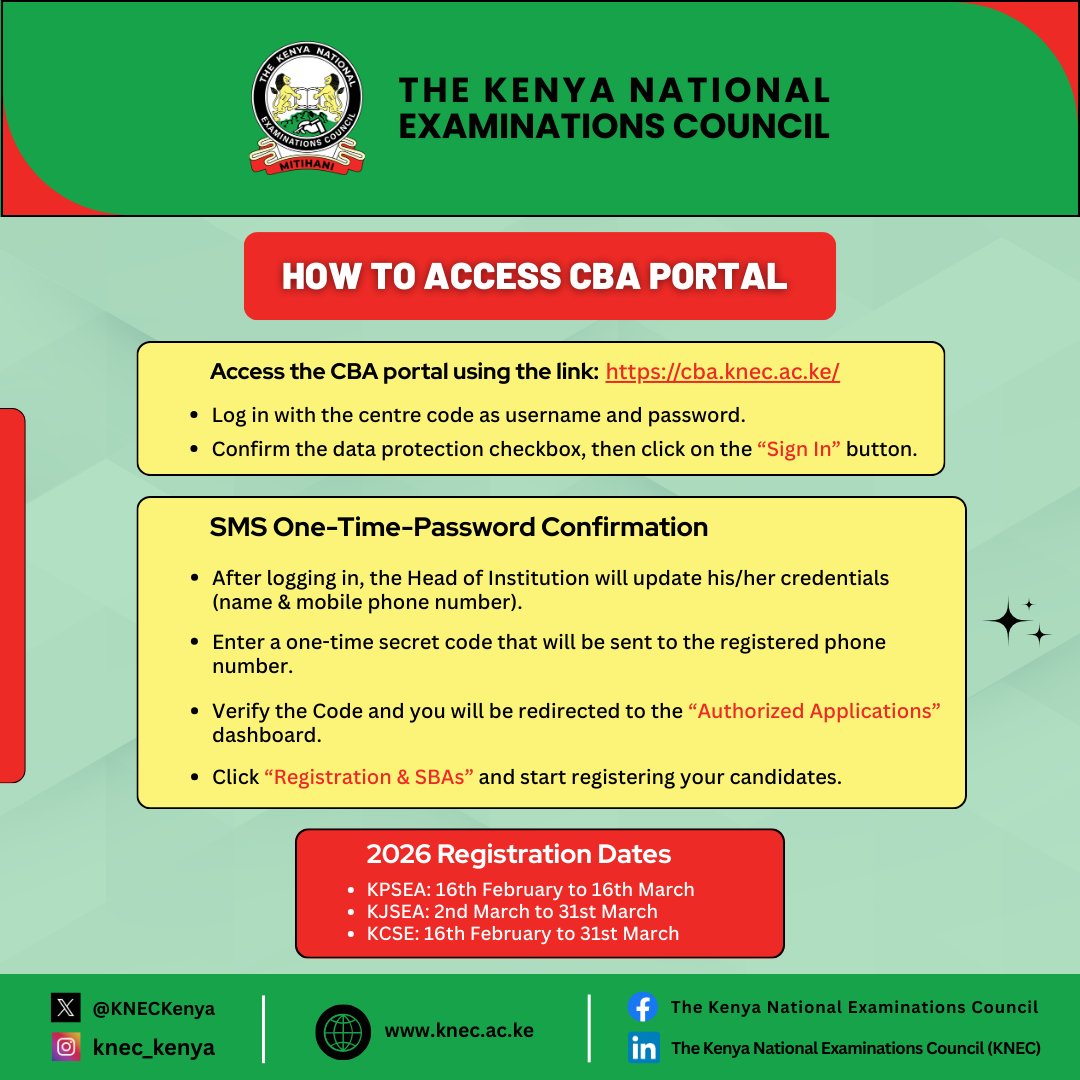
Step 1: Accessing the CBA Portal
The gateway to all candidate registrations is the official KNEC CBA portal. You can access it by typing the following link into your preferred web browser: https://cba.knec.ac.ke/.
Unlike standard logins that require personal emails, this portal is designed specifically for institutions. Your centre code serves as both your username and your initial password. This unified login ensures that only authorized personnel from recognized institutions can access the sensitive candidate data.
Once you have entered your centre code in both fields, you must confirm the data protection checkbox. This step is crucial, as it acknowledges your agreement to handle the candidates’ personal information in line with the country’s data privacy laws. After ticking the box, simply click on the “Sign In” button to proceed.
Step 2: The SMS One-Time-Password (OTP) Confirmation
Security is a top priority for KNEC, which is why a two-step verification process is in place. Upon your first login, you will be prompted to update your credentials as the Head of Institution. This involves confirming or updating your name and, most importantly, your mobile phone number.
Once you have saved these details, the system will instantly send a One-Time Secret Code (OTP) via SMS to the phone number you just registered. This code is your key to the rest of the portal. Enter the code you receive in the space provided and click “Verify.” This process ensures that only you, the authorized principal, have the power to make changes to your school’s candidate list.
Step 3: Navigating to the Registration Dashboard
After successful verification, you will be automatically redirected to the “Authorized Applications” dashboard. This is the central hub for all your assessment needs. From here, look for the specific icon or link that says “Registration & SBAs” (School-Based Assessments) .
Clicking this will take you to the area where the actual work begins. Here, you will find the interfaces for registering candidates for KPSEA (for primary schools) and KJSEA (for junior schools). Because KCSE registration is managed through a slightly different process, the CBA portal is primarily focused on the Competency-Based Curriculum (CBC) assessments, making it essential for primary and junior school heads.
Why You Must Act Now
The deadline of 31st March for KJSEA might feel like a long way off, but it will arrive quickly. Between now and then, schools face unexpected interruptions like sudden internet failure, power blackouts, or system maintenance windows. Furthermore, registering candidates requires entering accurate bio-data—names, admission numbers, and dates of birth—which takes time to collate and verify.
Registering your candidates today gives you a buffer. It allows you to double-check the entries and make corrections without the pressure of a looming deadline. It also ensures that your institution is ahead of the curve, allowing KNEC to process your data smoothly and prepare the necessary materials well in advance.
Do not be the principal scrambling on the 30th of March, frustrated by a slow connection or a forgotten password. Follow the steps above, log in to https://cba.knec.ac.ke/, and secure your candidates’ places today. The future of your students is too important to leave to chance.